> ## Documentation Index
> Fetch the complete documentation index at: https://docs.jojapi.com/llms.txt
> Use this file to discover all available pages before exploring further.
# Creating New API
> How to create an API in Studio.
1. First, open [**Studio**](https://jojapi.com/studio/dashboard).
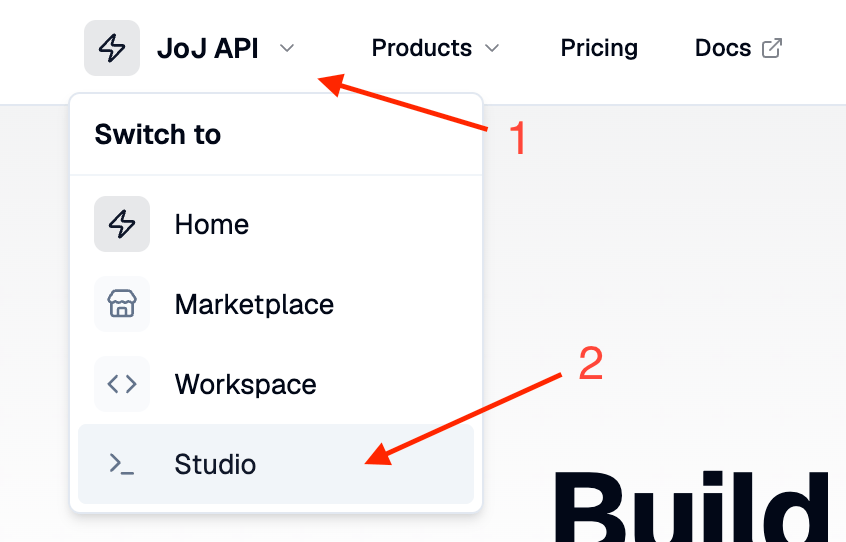 2. Go to the **My APIs** tab.
3. Click the **Create New API** button and fill in your API's details (you can change these at any time).
2. Go to the **My APIs** tab.
3. Click the **Create New API** button and fill in your API's details (you can change these at any time).
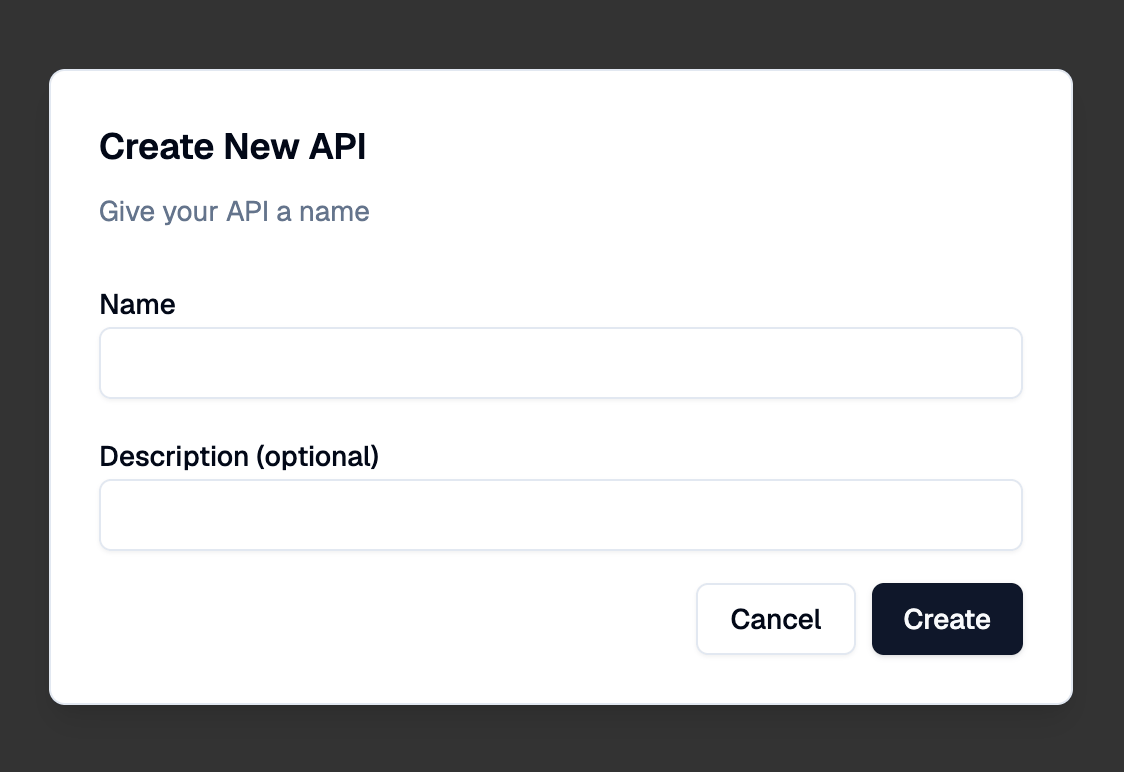 4. Click the **Create** button. Your API is created — next, add endpoints to make it ready for consumers.
> When you create an API, the system generates a **slug** from your API's name. The slug identifies your API and cannot be changed later.
## Provider onboarding
The Studio opens after a one-time onboarding step: you accept the provider terms and provider access is enabled immediately — there is no application or waiting period. Curation happens per API, at listing review.
## Visibility
Every API has one visibility setting in **Studio → your API → Settings**. New APIs start as **Private** drafts; you can switch freely between Private and Unlisted, and going **Public** is subject to review:
* **Private** — only you and existing subscribers can view the API page or subscribe.
* **Unlisted** — reachable by direct link and shown on your publisher profile; not on the marketplace.
* **Public** — on the marketplace, in search, and in sitemaps. Choosing Public submits your API for review (see below).
Visibility never affects existing subscribers' API access through the gateway.
## Naming and branding
API names must describe **what the API does**, not who made it — the publisher byline already identifies you, and your brand's home is your [publisher profile](#your-public-profile). At no point may API content (name, description, About, FAQ) carry your own brand or your website. Names that describe a **data source** are fine — "Amazon Product Data", "LinkedIn Profile Lookup" — because there the brand is the function itself.
Some typography is normalized automatically when you save: extra whitespace is collapsed, a trailing " API" is dropped (every listing is an API, and page titles already append the word), the word "api" is uppercased, and mid-name small words are lowercased ("Time And Date" → "Time and Date").
## Your public profile
Your publisher profile at `/hub/user/your-username` is the sanctioned place for your brand: set your **website, X, GitHub, and LinkedIn** links in **Settings → Account → Public profile links** and they appear on your profile next to every API you publish. Marketplace cards and API pages carry a **"by …"** byline with your display name, linking consumers to that profile.
Organizations can go one step further and become a [verified publisher](/studio/verified-publishers): prove you control your website's domain with a DNS record, pass a short review, and a verified tick appears next to your name everywhere the byline is shown.
## Listing review
jojapi is a curated API catalog. Choosing **Public** submits your API for review instead of publishing it directly:
1. **Automated checks** run first. Your API needs:
* at least one active target, and at least one active endpoint;
* every active endpoint connected to an active target, with a description and documented responses for at least 2 status codes (e.g. a success and an error);
* at least one public plan;
* a description of at least 40 characters, a custom logo, an About tab of at least 150 characters, and at least 2 FAQ entries.
If a check fails, you'll see exactly what to fix.
2. **Review by our team.** Once the checks pass, your submission goes into the review queue with the status **Pending review** (your API behaves as Unlisted while waiting). We evaluate API quality, documentation, legal standing, pricing, and — where a similar API is already listed — whether your API meets at least the standards of the existing listing. All documentation (description, About, FAQ, endpoint docs) must be in English. APIs in a [prohibited category](/legal/tos#prohibited-api-categories) (infringing or leaked content, unlawful content, adult content, illegal goods and substances) are not accepted in any form — listed, unlisted, or private.
3. **Decision.** You are notified when your API is approved (it goes **Public** on the marketplace) or rejected — a rejected API drops to **Unlisted** with the reason shown in the Studio; fix the issues and go Public again.
Public APIs are monitored continuously — uptime, error rates, support responsiveness, and catalog standards. If standards slip, you normally receive a **listing warning** first: an email with the flagged items and a fix-by deadline. Your API stays listed while the warning is open — address the issues and press **Submit for re-review** in the Studio before the deadline, and our team takes a final look (the warning is cleared, or the listing is removed). If the deadline passes without a resubmission, the API is automatically unlisted. In serious cases (e.g. legal issues) a listing can be **revoked** immediately without a warning. Either way the reason is shown in the Studio, you can go Public again after addressing it, and existing subscribers' gateway access is never cut off.
The full policy is part of the [Terms of Service](/legal/tos#api-listing-review-and-removal).
## API requests toggle
**API requests** in the same Settings card turns gateway traffic on or off. It only pauses requests — the API page, profile listing, and subscriptions stay visible. It cannot be turned off while your API is Public or in review; unlist first.
This documentation is built and hosted on [Mintlify](https://mintlify.com), a developer documentation platform.
4. Click the **Create** button. Your API is created — next, add endpoints to make it ready for consumers.
> When you create an API, the system generates a **slug** from your API's name. The slug identifies your API and cannot be changed later.
## Provider onboarding
The Studio opens after a one-time onboarding step: you accept the provider terms and provider access is enabled immediately — there is no application or waiting period. Curation happens per API, at listing review.
## Visibility
Every API has one visibility setting in **Studio → your API → Settings**. New APIs start as **Private** drafts; you can switch freely between Private and Unlisted, and going **Public** is subject to review:
* **Private** — only you and existing subscribers can view the API page or subscribe.
* **Unlisted** — reachable by direct link and shown on your publisher profile; not on the marketplace.
* **Public** — on the marketplace, in search, and in sitemaps. Choosing Public submits your API for review (see below).
Visibility never affects existing subscribers' API access through the gateway.
## Naming and branding
API names must describe **what the API does**, not who made it — the publisher byline already identifies you, and your brand's home is your [publisher profile](#your-public-profile). At no point may API content (name, description, About, FAQ) carry your own brand or your website. Names that describe a **data source** are fine — "Amazon Product Data", "LinkedIn Profile Lookup" — because there the brand is the function itself.
Some typography is normalized automatically when you save: extra whitespace is collapsed, a trailing " API" is dropped (every listing is an API, and page titles already append the word), the word "api" is uppercased, and mid-name small words are lowercased ("Time And Date" → "Time and Date").
## Your public profile
Your publisher profile at `/hub/user/your-username` is the sanctioned place for your brand: set your **website, X, GitHub, and LinkedIn** links in **Settings → Account → Public profile links** and they appear on your profile next to every API you publish. Marketplace cards and API pages carry a **"by …"** byline with your display name, linking consumers to that profile.
Organizations can go one step further and become a [verified publisher](/studio/verified-publishers): prove you control your website's domain with a DNS record, pass a short review, and a verified tick appears next to your name everywhere the byline is shown.
## Listing review
jojapi is a curated API catalog. Choosing **Public** submits your API for review instead of publishing it directly:
1. **Automated checks** run first. Your API needs:
* at least one active target, and at least one active endpoint;
* every active endpoint connected to an active target, with a description and documented responses for at least 2 status codes (e.g. a success and an error);
* at least one public plan;
* a description of at least 40 characters, a custom logo, an About tab of at least 150 characters, and at least 2 FAQ entries.
If a check fails, you'll see exactly what to fix.
2. **Review by our team.** Once the checks pass, your submission goes into the review queue with the status **Pending review** (your API behaves as Unlisted while waiting). We evaluate API quality, documentation, legal standing, pricing, and — where a similar API is already listed — whether your API meets at least the standards of the existing listing. All documentation (description, About, FAQ, endpoint docs) must be in English. APIs in a [prohibited category](/legal/tos#prohibited-api-categories) (infringing or leaked content, unlawful content, adult content, illegal goods and substances) are not accepted in any form — listed, unlisted, or private.
3. **Decision.** You are notified when your API is approved (it goes **Public** on the marketplace) or rejected — a rejected API drops to **Unlisted** with the reason shown in the Studio; fix the issues and go Public again.
Public APIs are monitored continuously — uptime, error rates, support responsiveness, and catalog standards. If standards slip, you normally receive a **listing warning** first: an email with the flagged items and a fix-by deadline. Your API stays listed while the warning is open — address the issues and press **Submit for re-review** in the Studio before the deadline, and our team takes a final look (the warning is cleared, or the listing is removed). If the deadline passes without a resubmission, the API is automatically unlisted. In serious cases (e.g. legal issues) a listing can be **revoked** immediately without a warning. Either way the reason is shown in the Studio, you can go Public again after addressing it, and existing subscribers' gateway access is never cut off.
The full policy is part of the [Terms of Service](/legal/tos#api-listing-review-and-removal).
## API requests toggle
**API requests** in the same Settings card turns gateway traffic on or off. It only pauses requests — the API page, profile listing, and subscriptions stay visible. It cannot be turned off while your API is Public or in review; unlist first.
This documentation is built and hosted on [Mintlify](https://mintlify.com), a developer documentation platform.